
Forms of silence a 3D printer

Are you bothered by the noise your 3D printer makes when you are printing your designs? If you are like most people, you are probably looking for a way to silence it. In this article, I am going to show you the best ways to silence a 3D printer.
Change motherboard:
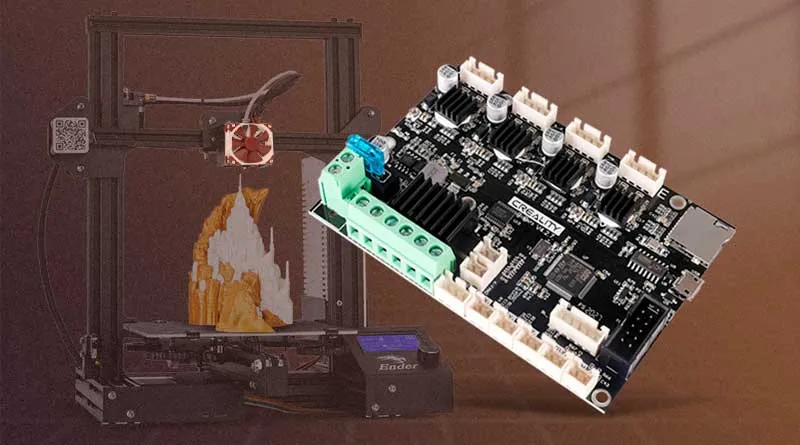
One of the best ways to silence a 3D printer is by changing the motherboard.
If you have an Ender 3, Ender 3 PRO, Ender 5 PRO for example, you can go for the TCM 2225 silent motherboard.
This motherboard uses silent stepper motor drivers and can significantly reduce noise from your 3D printer.
In addition, this upgrade can also improve the quality of your prints as the TCM2225 motherboard can provide better precision in the printer's movements.
Below I leave the link to Amazon for the TMC2225 controller board for Ender-3 / Ender-3 Pro/Ender 3 V2/Ender 5 /Ender 5 Pro
See all makes and models of silent motherboard (check the model of your printer well)
Change fans:
3D printer fans are another major source of noise, so replacing them can be a good solution.
The Noctua fans They are a great option as they are quieter than standard fans. Plus, you can install Noctua fans with custom adapters to fit your printer.
I'll leave you the link to the Noctua fans in case you want to check them out on Amazon.
Another option is the Super silent fan, these fans are just as quiet as the Noctua, although They are cheaper They can be a good option if you want a silent 3D printer.
Making these changes requires some knowledge, as the noctua fans are 12V while the Ender 3 originals are 24V.
Therefore you will have to be very careful if you decide to change them. Look for videos on youtube to inform you well before.
Video channel: BricoGeek
Use vibration dampers:
Dampers are parts that are placed between the motors and the printer frame. These components can absorb the vibration generated and reduce the noise of your 3D printer's motor.
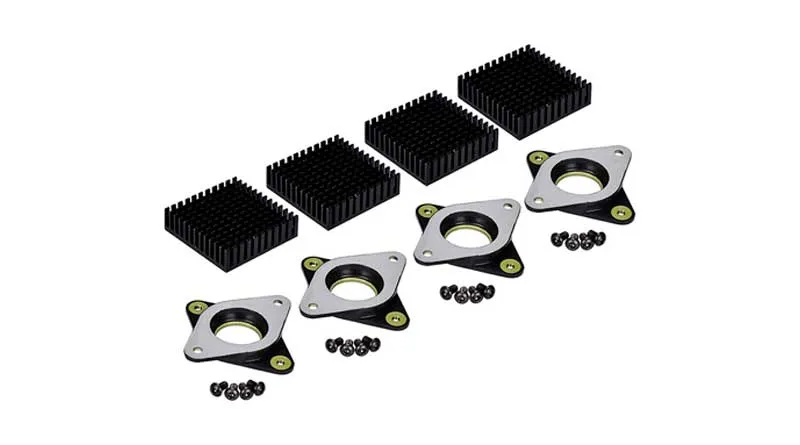
Dampers can be an effective solution to silence the noise of a 3D printer.
They are recommended for Ender 3 since in other models of 3D printers they can get hot and cause skipping steps
Video channel: Teaching Tech (Activate subtitles)
Enclose the printer:
Soundproofing can be an effective way to soundproof a 3D printer. This can be done by placing the printer in a soundproof cabinet or enclosure.
In this way, you can reduce the noise generated by the printer and maintain a quieter environment.
Additionally, the box can also help maintain a more constant temperature, which can improve the quality of prints.
If you decide to enclose your printer, make sure the case is ventilated and has enough space for the 3D printer to operate smoothly.
It is possible to build your own with some basic materials. Here you can see the prices of some panels of Self-adhesive acoustic foam on Amazon.
Conclusions of silencing a 3D printer:
As you can see, there are several effective ways to silence a 3D printer. From changing the motherboard, fans, and vibration dampers, to enclosing the printer, each method has its advantages and disadvantages.
Before choosing an option, you have to consider how much time and money are you willing to invest.
For example, replacing the motherboard and fans can be more expensive than simply adding some vibration dampers. Also, some options may require technical and DIY skills to install properly.
Which option you choose will depend on your specific needs and how much you're willing to spend. With any of these options, you can reduce the noise from your 3D printer and continue printing in peace and quiet.
Before making any changes to your 3D printer, it's important to do your research and make sure you know what you're doing.
And if you don't feel comfortable making changes to the electronics of your 3D printer, You can always seek the help of a professional.
Frequently Asked Questions:
Is it safe to change the motherboard of a 3D printer?
Yes, it is safe to change the motherboard of a 3D printer as long as you know what you are doing and have experience in electronics and programming. If you are unsure how to do this, it is best to seek help from someone who has experience in this area.
How much noise can 3D printer fans make?
3D printer fans can be quite loud, depending on the model and brand of the printer. In general, high-speed fans tend to be louder than low-speed fans. Noctua fans are a great option for reducing the noise of your 3D printer.
Do vibration dampers really help reduce noise from a 3D printer?
Yes, vibration dampers can help reduce the noise of a 3D printer by absorbing the vibrations generated during printing. However, it is important to note that not all vibration dampers are created equal and some may be more effective than others.
Do I need to enclose my 3D printer to reduce noise?
Not necessarily. Enclosing a 3D printer can help reduce noise, but it can also increase the temperature inside the build chamber, which can affect the quality of your prints. If you decide to enclose your 3D printer, make sure that the temperature inside the build chamber does not exceed the limits recommended by the printer manufacturer.
Thank you for visiting. I invite you to read: «How to store 3D printing filaments» a post you might find interesting.


Responses